
This n8n workflow automatically reads new incoming emails using IMAP, uses AI to decide whether the email needs a reply, and if yes — generates and sends a professional response automatically.
It’s a powerful “email assistant” workflow that avoids replying to newsletters, spam, promotions, or automated notifications.
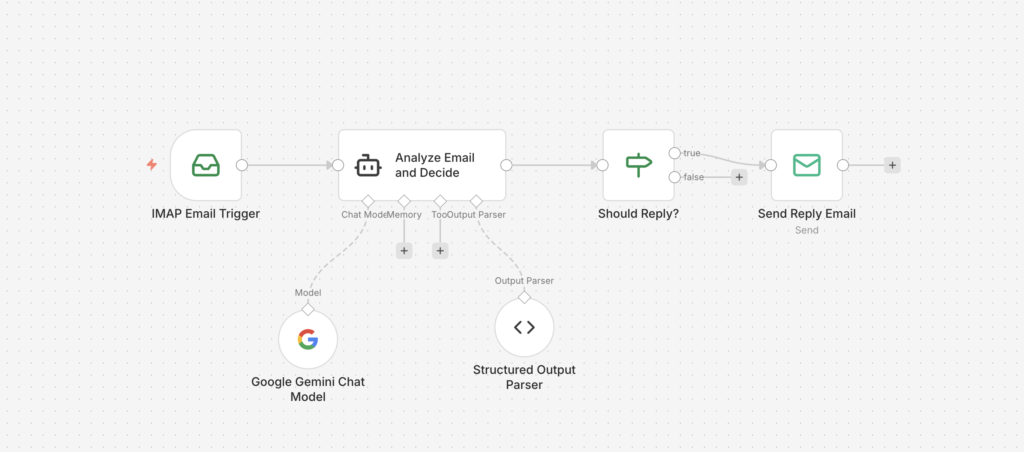
🎯 What This Workflow Does (Simple Overview)
Whenever a new email arrives:
- IMAP Email Trigger detects the email
- AI reads the email and decides:
- ✅ Should we reply?
- ✅ If yes, what should the reply be?
- IF Node checks the decision
- If reply is needed → Send Reply Email sends the AI-written response
The workflow uses structured output (true/false + reply text) so it stays consistent and reliable. AI-Powered IMAP Email Auto-Resp…
🧩 Workflow Nodes Included
| Step | Node Name | Purpose |
|---|---|---|
| 1 | IMAP Email Trigger | Watches inbox and fetches new emails |
| 2 | Analyze Email and Decide | AI agent reads email + generates decision + reply |
| 3 | Anthropic Chat Model | Claude model used for response generation |
| 4 | Structured Output Parser | Forces output into correct JSON schema |
| 5 | Should Reply? (IF node) | Routes workflow based on shouldReply |
| 6 | Send Reply Email | Sends AI-generated reply to sender |
✅ Requirements Before You Start
To run this workflow successfully, you need:
- ✅ An n8n instance (cloud or self-hosted)
- ✅ IMAP credentials (Gmail / Outlook / business email)
- ✅ SMTP credentials (to send replies)
- ✅ AI model access (Claude is used in this workflow)
📥 Step 1 — Download the Workflow File
Import this directly into n8n:
👉 Download here:
https://drive.google.com/file/d/1XYt_Ub0q21v6CLvx0F_IRpz_AKDzV5e8/view?usp=sharing
⚙️ Step 2 — Import the Workflow into n8n
- Open n8n
- Go to Workflows
- Click Import from File
- Upload the downloaded JSON
- Save the workflow
✅ You’ll now see the full workflow with nodes connected.
📬 Step 3 — Configure the IMAP Email Trigger
Click on IMAP Email Trigger and set:
Required Settings
- Host (example:
imap.gmail.com) - Port (usually
993) - Username: your email address
- Password: email password or app password
- Enable SSL/TLS
Gmail Tip (Important)
If you’re using Gmail, you must generate an App Password (Google doesn’t allow normal passwords for IMAP in most cases).
✅ After saving credentials, test it by sending yourself an email and using Execute Workflow.
🧠 Step 4 — AI Decision Logic (Smart Reply Detection)
The AI node (Analyze Email and Decide) receives:
- Email sender (
from) - Email subject
- Email body (
text)
Then it decides if a response is needed.
✅ It WILL reply to:
- Questions needing answers
- Requests for information or action
- Business inquiries
- Customer support requests
- Meeting/appointment messages
❌ It will NOT reply to:
- Newsletters
- Marketing emails
- Automated notifications
- No-reply emails
- Spam/promotions
- Informational emails without questions
The output always follows this structured format:
{
  "shouldReply": true,
  "replyMessage": "Your AI reply here..."
}
That consistency is enforced using the Structured Output Parser. AI-Powered IMAP Email Auto-Resp…
✅ Step 5 — IF Node (“Should Reply?”)
This node checks:
- If
shouldReply == true→ continue to Send Reply Email - If
false→ workflow ends (no reply sent)
This is the main safety gate that prevents replying to junk messages. AI-Powered IMAP Email Auto-Resp…
✉️ Step 6 — Configure the Send Reply Email Node
Open Send Reply Email and update:
Replace From Email
You must replace this placeholder:
<__PLACEHOLDER_VALUE__Your reply email address__>
Recipient (Auto-filled)
This field is already correctly mapped:
{{ $('IMAP Email Trigger').item.json.from }}
Subject
Automatically adds Re::
Re: {{ $('IMAP Email Trigger').item.json.subject }}
Email Body
Uses AI reply message:
{{ $json.replyMessage }}
✅ Ensure your SMTP credentials are configured correctly.
🧪 Step 7 — Test the Workflow
Try 2 tests:
Test 1: Real question email
Send:
“Hi, can you confirm the meeting time tomorrow?”
✅ The workflow should reply automatically.
Test 2: Newsletter / promotion
Forward a marketing email.
✅ It should NOT reply.
🔒 Best Practices (Highly Recommended)
To avoid unwanted automation issues:
✅ Use a dedicated inbox (support@ / info@)
✅ Apply filters (only reply to certain senders/domains)
✅ Add a tag/label after replying
✅ Add protection against reply loops (replying to your own replies)
🚀 How Media87 Can Help You Build Custom n8n Workflows
If you want workflows like this built professionally and customized for your business, Media87.com can help you design and implement end-to-end automation systems using n8n + AI + integrations.
✅ Services We Offer at Media87.com
We build automation systems that help businesses:
- 📩 Automate email responses (support, HR, sales)
- 📲 Connect WhatsApp, Telegram, Instagram, Facebook, and CRM tools
- 🧠 Add AI decision-making for smarter workflows
- 🧾 Automate invoices, reporting, and spreadsheets
- 🏢 Integrate business apps (Google Workspace, Slack, Notion, HubSpot, Zoho, ERP systems)
- 🔁 Automate repetitive tasks and approvals
- 🛠️ Build internal bots and custom workflow dashboards
✅ What You Get When We Build Workflows for You
When Media87 builds an automation for you, we deliver:
✅ Workflow design + logic mapping
✅ Custom n8n workflow build + testing
✅ AI prompt optimization (so replies are professional & safe)
✅ Integration setup (email, CRM, databases, webhooks)
✅ Documentation + team handover
✅ Support / improvements after deployment
Examples of Workflows We Can Build
- AI WhatsApp lead assistant
- Invoice + payment follow-up automation
- HR onboarding automation
- Customer support triage system
- Meeting + reminder automation
- Social media posting workflows
- Smart internal reporting dashboards
If you’re serious about saving time, improving response speed, and cutting manual work — automation pays for itself very quickly.
✅ Conclusion
This n8n workflow turns your inbox into a smart assistant:
✔️ Reads emails
✔️ Decides whether reply is needed
✔️ Generates a professional response
✔️ Sends replies automatically
✔️ Avoids newsletters/spam by design AI-Powered IMAP Email Auto-Resp…